Neck posture is not just “sit up straight”—it is the sum of small, repeatable choices about where you put your screen, chair, keyboard, mouse, and documents.
When those choices match basic human biomechanics, your head stacks naturally over your shoulders and your neck muscles don’t have to grind all day.
When they do not, your neck sits in subtle strain that snowballs into stiffness, headaches, and fatigue.
The good news: a few targeted ergonomic tweaks can noticeably reduce awkward neck angles and make long work sessions feel easier.
Safety agencies and international ergonomics standards agree on practical workstation dimensions that anyone can apply at home or in the office.
Clinical programs that pair workstation changes with education and movement breaks consistently report fewer neck and upper-back complaints.
You do not need fancy gear—most wins come from millimeters of adjustment and minutes of timely breaks.
This guide by bestforwardheadposturefix.com distills the most reliable, standards-based steps to improve your neck posture—today.
Article Index
- The Neck-Posture Problem: Why Setups Matter
- Evidence Snapshot: What Studies and Standards Say
- The 12-Point Workstation Checklist for a Neutral Neck
- Laptop, Dual-Monitor, and Bifocal Scenarios
- Sit–Stand Strategy: How to Add Standing Without Neck Strain
- Movement Microbreaks: Tiny Habits, Big Relief
- Lighting and Glare: The Posture–Vision Loop
- Training the Support System: Simple Strength Endorsements
- Putting It All Together: A Fast Setup Script
The Neck-Posture Problem: Why Setups Matter
Your head weighs about as much as a bowling ball in neutral. Tilt it forward and the effective load on the cervical spine jumps dramatically with every few degrees of flexion.
That extra load is why a “just a little” chin tuck toward the screen eventually feels like a lot by day’s end. Computer-heavy work magnifies the problem: fixed gazes, low monitors, far-away mice, and soft seating all coax the head forward and round the upper back.
Ergonomics aims right at these causes—aligning equipment to your body so your neck can live closer to neutral most of the day.
Standards and government guidance translate that principle into simple, reproducible dimensions for screen height, viewing distance, keyboard and mouse placement, and chair setup.
Evidence Snapshot: What Studies and Standards Say
Standards and Guidance:
Modern visual-display ergonomics emphasizes keeping the gaze slightly downward, the screen at or just below eye level, and the viewing distance around arm’s length.
Chairs should support the lumbar curve so the pelvis stays neutral, which keeps the thorax upright and the head from drifting forward. Document placement and lighting are recognized posture drivers—poorly positioned papers or glare can force sustained neck flexion or extension.
Trials and Reviews:
Workplace interventions that combine workstation adjustments with brief training and regular movement breaks tend to reduce musculoskeletal discomfort in office workers.
Reviews often note that ergonomics alone can be modest, but the effect improves when you add posture variation, microbreaks, and simple strengthening. The pattern is consistent: precise setup + repeatable habits beats one-time fixes.
Sit–Stand Use:
Sit–stand desks reduce uninterrupted sitting and commonly improve upper back/neck symptoms—when users actually alternate positions and set heights correctly. Over-standing or sloppy heights can simply trade one strain for another, so technique matters.
The takeaway: posture-friendly layout, movement variety, and light strength work are a dependable bundle for neck comfort.
The 12-Point Workstation Checklist for a Neutral Neck
Screen Height (your biggest lever).
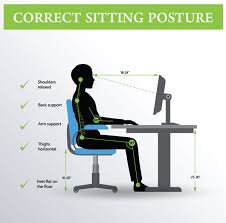
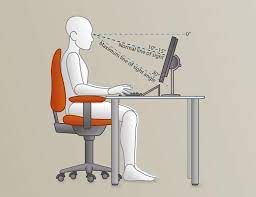
Center the monitor directly in front of you. Set the top line of text at or slightly below eye level so the screen center lands about 15–20° below straight-ahead gaze. This keeps the chin level and avoids “turtle” head thrust.
Viewing Distance.
Aim for roughly 50–70 cm (about an arm’s length). If you find yourself leaning forward, bring the screen a bit closer within that range or increase text/UI size.
Screen Alignment.
Keep the monitor centered to your midline. If you reference paper constantly, place a document holder right beside the screen so your eyes, not your neck, do most of the traveling.
Chair Height.
Adjust until feet are flat on the floor or a footrest, with hips at or slightly higher than knees. This stacks the torso and gives the neck a neutral starting point.
Seat Depth & Lumbar.
Leave a small gap (about 2–3 fingers) between the seat edge and your calves. Use built-in lumbar support or a small roll to maintain the low-back curve. When the pelvis is supported, the head naturally sits farther back over the shoulders.
Armrest
Raise or lower until they just “catch” your forearms without lifting the shoulders. Adjust the height of your chair to fix text neck posture. Too high causes shrugged shoulders and neck tension; too low removes support and encourages reaching.
Keyboard Height & Tilt.
Keep wrists straight and aligned with forearms; elbows close to the body at roughly 90–120°. A keyboard tray or a slight negative tilt can help you maintain neutral wrists while keeping the shoulders relaxed.
Mouse Placement.
Put the mouse right next to the keyboard at the same height—no reaching. A poorly placed mouse is a common trigger for shoulder elevation and neck fatigue.
Document Holder.
If you transcribe or compare texts, use a holder adjacent to the screen. Repeated glances down to the desk create sustained neck flexion that adds up quickly.
Avoid Soft Seating for Work.
Sofas encourage a slumped pelvis and flexed neck. If you must use one, add cushions to create a firmer base and a makeshift lumbar roll, and raise the laptop to eye level with an external keyboard and mouse.
Eyewear Considerations.
Bifocals and progressives can nudge people into a chin-up posture to find the near segment. Lower the screen slightly, or talk to your optometrist about single-vision computer lenses that keep the head neutral.
Phone Habits.
Do not clamp the phone between ear and shoulder—use a headset. When reading on handhelds, lift the cellphone device closer to eye level to avoid excessive neck flexion.
Laptop, Dual-Monitor, and Bifocal Scenarios
Laptop-Only Setups:
A laptop links a low screen to a high keyboard—great for travel, rough on necks. The fix is simple: put the laptop on a riser or a stack of books to get the top of the screen to eye level and plug in an external keyboard and mouse. Now the neck and wrists can both be neutral.
Dual Monitors:
Place monitors close together. If you use one most of the time, center that one. If you use both equally, center the seam between them so your head rotates less. Keep dual monitors at the same height and distance to prevent side-bending or reaching.
Bifocals/Progressives:
If you wear multifocal lenses, confirm you aren’t tilting your head back to find focus. Lower the monitor slightly, increase on-screen text size, and consider task-specific lenses that eliminate the need for cervical extension.
Sit–Stand Strategy: How to Add Standing Without Neck Strain
Sit–stand desks shine when they promote posture variety rather than long marathons of standing.
The same neutral rules apply in standing as in sitting: elbows around 90–100°, screen top at or slightly below eye level, and the screen center a touch below straight-ahead gaze.
How to Phase it In?
- Start small. Try 10–15 minutes of standing every 30–60 minutes of sitting for a week, then build gradually.
- Dial the heights. If your shoulders creep up or your neck tightens, the keyboard is probably too high or the screen too low.
- Use cues. Set gentle reminders to switch, or pair transitions with routine tasks (calls, coffee, quick reviews).
- Keep moving. Standing still can be just as static as sitting. Shift weight, do a few calf raises, or take a quick lap during breaks.
The goal is not to stand more; it is to avoid any one posture owning your day.
Movement Microbreaks: Tiny Habits, Big Relief
Static postures are the quiet enemy of your neck. Microbreaks offload tissues before strain accumulates and they are short enough to protect productivity.
A Practical Cadence You will Actually Keep:
- Every 20–30 minutes: 30–60 seconds to reset posture—un-hunch, look far into the distance, roll the shoulders, and do two or three gentle chin retractions.
- Each hour: A 3–5 minute stand-up and short walk to relax the eyes and change muscle activation.
- Across the day: Sprinkle in thoracic extension over the chair back, doorway pec stretches, or a few scapular squeezes.
These “movement snacks” are the difference between ending the day compressed and ending it refreshed.
Lighting and Glare: The Posture–Vision Loop
Vision drives posture. If the screen is hard to read, you will crane your head toward it.
Manage light so your eyes, not your neck, do the work.
- Tame glare. Place the monitor perpendicular to windows and reduce reflections from overhead lighting.
- Adjust tilt. Tilt the screen just enough to be perpendicular to your line of sight without reflecting light sources.
- Use contrast and size. Increase zoom or font sizes instead of leaning in.
- Rest the eyes. Follow a simple habit like focusing on something far away for 20 seconds every 20–30 minutes.
Better visibility equals fewer compensations from your neck and shoulders.
Training the Support System: Simple Strength Endorsements
Ergonomics sets the stage; your muscles hold the pose. Programs for neck pain consistently endorse light strengthening and endurance work for the deep neck flexors, scapular stabilizers, and thoracic extensors.
You do not need long gym sessions—short, frequent “greasing the groove” sets work well.
A Sample Micro-Routine (3–5 minutes, 2–3x/day):
- Chin retractions (deep cervical flexors): Sit tall, gently draw your chin straight back as if making a double chin. Hold 3–5 seconds, repeat 8–10 times.
- Scapular retraction/depression: With arms at sides, imagine sliding your shoulder blades down and together. Hold 5 seconds, repeat 10 times.
- Thoracic extensions over chair base: Hands behind head, lean over the chair’s top edge to open the chest. 6–8 slow reps.
- Wall angels or band pull-aparts: Encourage external rotation and postural endurance. 10–12 reps.
If you have a pain condition or recent injury, tailor volume and exercises with a clinician’s guidance.
Putting It All Together: A Fast Setup Script
- Chair first. Feet flat; hips at or slightly above knees; lumbar supported; 2–3 finger gap behind knees. Adjust armrests to lightly support forearms without lifting shoulders.
- Keyboard and mouse. Elbows near the torso at roughly 90–120°; wrists straight; mouse immediately next to the keyboard at the same height.
- Centered in front of you; top of screen at or just below eye level; screen center slightly below straight-ahead gaze; about arm’s length away; oriented to reduce glare.
- Documents and devices. Use a document holder near the screen; raise handhelds closer to eye level; use a headset for calls.
- Posture variation. Adopt a sit–stand rhythm you can sustain and schedule microbreaks you’ll actually do.
- Progress checks. If you’re leaning forward, fix the reason: increase font size, tweak brightness/contrast, bring the screen closer, or adjust chair height—not your willpower.
FAQs on Ergonomic Adjustments to Fix Tech Neck
This FAQ section highlights how simple ergonomic adjustments can significantly improve neck posture, reduce pain, and support long-term spinal health through practical, data-driven strategies:
Q-1. How do ergonomic adjustments improve neck posture and reduce pain at work?
A-1. Ergonomic adjustments align the spine and reduce strain on neck muscles by optimizing desk height, chair support, and screen positioning. In the USA, nearly 65% of office workers report neck pain, but proper ergonomic setups can reduce discomfort by up to 40%. By maintaining a neutral spine position, these adjustments prevent long-term musculoskeletal issues and improve daily comfort.
Q-2. What is the best ergonomic desk setup to fix forward head posture and neck strain?
A-2. The ideal setup includes a monitor at eye level, a chair with lumbar support, and feet flat on the floor. Forward head posture affects about 70% of desk workers, especially in cities like San Francisco and New York. Adjusting screen distance to 20–30 inches and keeping shoulders relaxed can significantly reduce neck strain within a few weeks.
Q-3. What are step-by-step ergonomic adjustments for better neck posture while sitting?
A-3. Start by adjusting chair height so knees are at a 90-degree angle, position the monitor at eye level, keep elbows at desk height, and ensure back support. Studies show that workers who follow ergonomic steps experience a 30–50% improvement in posture within 8 weeks, making it a practical long-term solution.
Q-4. How do chair height and monitor position affect neck posture ergonomics?
A-4. Incorrect chair height and low monitor placement force the neck into a forward or downward tilt, increasing strain. Research indicates that improper positioning can increase neck pressure by up to 60%. Proper alignment reduces stress on cervical joints and improves overall posture efficiency.
Q-5. What are ergonomic tips to correct neck posture for computer users naturally?
A-5. Key tips include taking breaks every 30 minutes, keeping screens at eye level, and maintaining a straight back. Around 68% of computer users who adopt these habits report reduced neck stiffness. Simple changes like using a document holder or external keyboard can also make a noticeable difference.
Q-6. Does ergonomic workspace setup reduce chronic neck pain effectively?
A-6. Yes, ergonomic setups are proven to reduce chronic neck pain. Studies show that consistent ergonomic improvements can lower pain intensity by up to 50% over 12 weeks. In the USA, workplace wellness programs increasingly include ergonomic training due to its effectiveness in reducing absenteeism.
Q-7. How can you adjust laptop height and keyboard for proper neck alignment?
A-7. Raising the laptop using a stand and using an external keyboard helps maintain proper neck alignment. About 75% of laptop users experience neck discomfort due to poor positioning. Elevating the screen to eye level can reduce strain significantly and improve posture within days.
Q-8. What is the science behind ergonomic posture correction and cervical spine health?
A-8. Ergonomics focuses on maintaining the natural curvature of the spine, reducing stress on cervical discs and muscles. Research shows that proper posture can decrease spinal load by up to 35%. Institutions like Harvard Health emphasize ergonomics as a key factor in preventing long-term neck disorders.
Q-9. What are common ergonomic mistakes that worsen neck posture and pain?
A-9. Common mistakes include slouching, using low screens, and sitting for prolonged periods without breaks. About 60% of workers unknowingly adopt poor posture habits that lead to chronic pain. Avoiding these mistakes can significantly improve neck health and reduce discomfort.
Q-10. What are the best ergonomic tools and accessories to improve neck posture fast?
A-10. Popular tools include adjustable chairs, monitor stands, ergonomic keyboards, and posture correctors. Around 55% of users report immediate relief after using ergonomic accessories. In 2026, demand for these tools continues to rise as more people prioritize workplace health and posture improvement.
Conclusive Analysis
Neck posture improves when your workstation stops fighting your body and starts matching it.
Standards exist for a reason: they translate biomechanics into clear heights, distances, and angles that any desk can meet.
The research pattern is also clear: precise setup on day one, small adjustments in week one, and consistent movement across every week.
Your biggest wins come from tiny changes—a screen nudged up a centimeter, a chair lifted one click, a 60-second reset every half hour.
Avoid soft-seat slouching and keep handheld screens higher; the physics of forward head tilt adds up quickly.
If you add a sit–stand option, treat it as variety training, not an endurance test.
Finally, teach the support system with brief, regular doses of deep-neck and scapular endurance work so neutral alignment feels effortless.
Do these consistently and your neck will feel lighter, your posture will look stronger, and your work will feel easier—without buying anything you do not need.
References: