Raise your screen to eye level and get up every 30 to 60 minutes. Those two changes cut the load on your neck faster than anything else you can do today. Add chin tucks between meetings and most people notice less stiffness within one to two weeks. Persistent numbness, tingling, or weakness needs medical attention, not another stretch. BestForwardHeadPostureFix and clinicians at places like Cleveland Clinic build their guidance around exactly this order: fix mechanics first, then reinforce with movement.
TL;DR:
- Raising your screen to eye level and moving every 30 to 60 minutes significantly reduces neck strain caused by forward head posture.
- Proper ergonomic setup, including monitor height at or near eye level and close placement of keyboard and mouse, prevents the forward drift that worsens neck pain.
- Daily exercises like chin tucks and stretches for upper traps are essential to strengthen muscles and address muscle imbalance from prolonged poor posture.
- Stress increases muscle tension and leads to worse posture, so incorporating movement breaks during high-pressure periods can alleviate tension-related neck discomfort.
- Consistent sleep, hydration, and activity outside work hours support neck health and mitigate sedentary risks that exacerbate desk-related neck pain.
Table of Contents
- What Causes Neck Pain From a Desk Job
- Your 24 to 72 Hour Plan for Neck Pain Relief at Work
- How to Set Up an Ergonomic Desk to Prevent Neck Strain
- Exercises and Stretches That Actually Relieve Desk Neck Pain
- When Neck Pain Needs Professional Treatment
- BestForwardHeadPostureFix’s Approach to Fixing Desk-Related Posture
- Why Stress Makes Desk-Related Neck Pain Worse
- Sleep, Hydration, and Activity: The Lifestyle Side of Neck Pain
- What Actually Moves the Needle on Desk Neck Pain
- Sources
What Causes Neck Pain From a Desk Job
Your head weighs 10 to 12 pounds sitting on top of your spine. Tip it forward, the way most people do when staring at a laptop screen, and the effective load on your cervical spine climbs by roughly 10 pounds for every inch it moves forward. Three inches of forward head posture, which is common among people hunched over keyboards, can mean your neck is supporting close to 40 pounds instead of 12.
A handful of habits create that forward drift:
- A monitor set too low, forcing your chin down for hours
- A keyboard or mouse positioned out of easy reach, pulling your shoulders forward
- Long stretches without changing position, which stiffens tissue even in a “correct” posture
- Checking a phone with your head dropped instead of the device raised
- A rounded thoracic spine, which drags the neck forward to compensate
Mayo Clinic lists poor posture and prolonged static positioning among the most common mechanical causes of neck pain, and that lines up with what most desk workers describe: an ache that builds through the afternoon and eases somewhat overnight.
That pattern is ordinary desk strain. Numbness or tingling down an arm, progressive weakness in your hand, or pain that started after a fall or car accident is not. Those symptoms warrant a call to your doctor, not a new pillow.
Your 24 to 72 Hour Plan for Neck Pain Relief at Work
You don’t need new furniture to feel better by Friday. You need to stop repeating the motions that got you here.
- Raise your screen. The top third of the display should sit at or just below eye level. Stack books under a laptop or monitor if you don’t have a riser handy.
- Get an external keyboard if you’re on a laptop. Typing on the built-in keyboard forces your head down and your shoulders forward at the same time.
- Set your monitor at arm’s length. Roughly 20 to 26 inches away keeps you from craning forward to read text.
- Move every 30 to 60 minutes. Stand, walk to refill your water, or just roll your shoulders. Static positions cause stiffness even when your setup is technically correct.
- Try the 20-20-20-20 rule. Every 20 minutes, look 20 feet away for 20 seconds, and adjust your posture with 20 degrees of movement somewhere in your spine.
- Go hands-free on calls. Cradling a phone between your ear and shoulder is one of the fastest ways to spike neck tension.
- Reset your chin position during long calls. A few chin tucks while you listen resets the forward drift that builds during a 45-minute meeting.
Over-the-counter pain relief can help in the short term, but follow the label dosing and don’t use it as a substitute for fixing the setup that’s causing the pain.
Pro Tip: Set a recurring calendar alert labeled “stand up” instead of relying on willpower. Most people ignore a vague intention to move more; almost nobody ignores a calendar ping.
How to Set Up an Ergonomic Desk to Prevent Neck Strain
Quick fixes buy you relief. A properly set up workstation prevents the problem from coming back. Here’s what the numbers actually look like.
| Element | Target setup |
|---|---|
| Monitor height | Top third of screen at or near eye level |
| Monitor distance | 20 to 26 inches from your eyes |
| Chair recline | 110 to 120 degrees |
| Seat depth | 2 to 3 finger-widths of space behind your knees |
| Keyboard/mouse | Close enough that elbows stay near your sides |
| Feet | Flat on the floor or a footrest |
Your chair matters more than most people assume. Look for one with lumbar support that actually contacts your lower back, not just a curved backrest that misses the mark. A slight recline of 110 to 120 degrees, rather than sitting bolt upright, reduces disc pressure and takes some load off the muscles trying to hold your head up. Armrests should let your elbows rest without shrugging your shoulders up or out.
Keyboard and mouse placement matters just as much as monitor height. If you have to reach forward or sideways to use either one, your shoulders round forward and your neck follows. Keep both close enough that your elbows stay roughly at your sides.
Laptop users need a slightly different fix: a stand to get the screen to eye level, paired with an external keyboard and mouse so your hands aren’t forced down at the same time your neck is forced down to see the screen. And if you catch yourself leaning toward the screen to read text, increase the font size before you touch anything else. Poor lighting that causes squinting has the same effect. Ergonomic adjustments change the actual mechanics of how your spine loads, which is why they outperform posture reminders alone.
Exercises and Stretches That Actually Relieve Desk Neck Pain
Setup changes reduce new strain. Exercise addresses the muscle imbalance that’s already built up from months or years of forward head posture.
- Chin tucks. Pull your chin straight back, like you’re making a double chin, without tilting your head down. Hold two seconds, do 10 reps, three times a day. This is the single most useful exercise for desk-related neck pain because it strengthens the deep cervical flexors that forward head posture weakens.
- Upper trap and levator stretches. Tilt your ear toward your shoulder, using light hand pressure to deepen the stretch, and hold 20 to 30 seconds per side. Repeat two to three times daily, especially after long typing stretches.
- Wall angels. Stand with your back flat against a wall, arms in a goalpost position, and slide them up and down while keeping contact with the wall. This targets the mid-back muscles that let your shoulders round forward in the first place.
- Prone Y raises. Lying face down, lift your arms into a Y shape and squeeze your shoulder blades together. Two sessions of 10 to 15 minutes a week build the strength needed to hold better posture without conscious effort.
A realistic daily rhythm looks like this: chin tucks three times during work hours, a trap stretch after lunch, movement breaks every half hour to hour, and two short strengthening sessions during the week rather than a long workout you’ll skip. A structured routine that pairs these exercises with your workstation changes tends to outperform either approach alone.
Pro Tip: Anchor chin tucks to something you already do, like every time you refill your coffee. Habits stick better attached to an existing routine than to a standalone reminder.
When Neck Pain Needs Professional Treatment
Most desk-related neck pain responds to the changes above within two to four weeks of consistent effort. A 12-week program combining exercise, ergonomic changes, and education produced a statistically significant drop in pain frequency and disability among office workers in a controlled trial, which is a reasonable timeline to expect for meaningful improvement, not full resolution overnight.
See a doctor or physical therapist if you notice:
- Numbness or tingling radiating into your arm or hand
- Progressive weakness in your grip or arm
- Pain that started after a fall, car accident, or other trauma
- Symptoms that haven’t improved after three to four weeks of consistent ergonomic and exercise changes
- Fever, unexplained weight loss, or night pain alongside neck symptoms
If you’ve made the changes above consistently for a month with no improvement, a physical therapist can assess movement patterns you can’t see yourself and build a progression beyond the basics.
BestForwardHeadPostureFix’s Approach to Fixing Desk-Related Posture
Individual fixes help, but they work best as a system. BestForwardHeadPostureFix builds its guidance around three connected pieces:
- Awareness training so you notice forward head drift before it becomes hours of strain
- Workstation correction using the monitor, chair, and keyboard benchmarks covered above
- Muscle rebalancing through the chin tuck, stretch, and strengthening progressions that retrain posture long term
If you want the step-by-step version of the desk setup, the ergonomic desk guide walks through monitor and chair adjustments in more detail, and the posture correction techniques guide expands on the exercise progressions for readers who want a longer-term program rather than a quick patch.
Why Stress Makes Desk-Related Neck Pain Worse
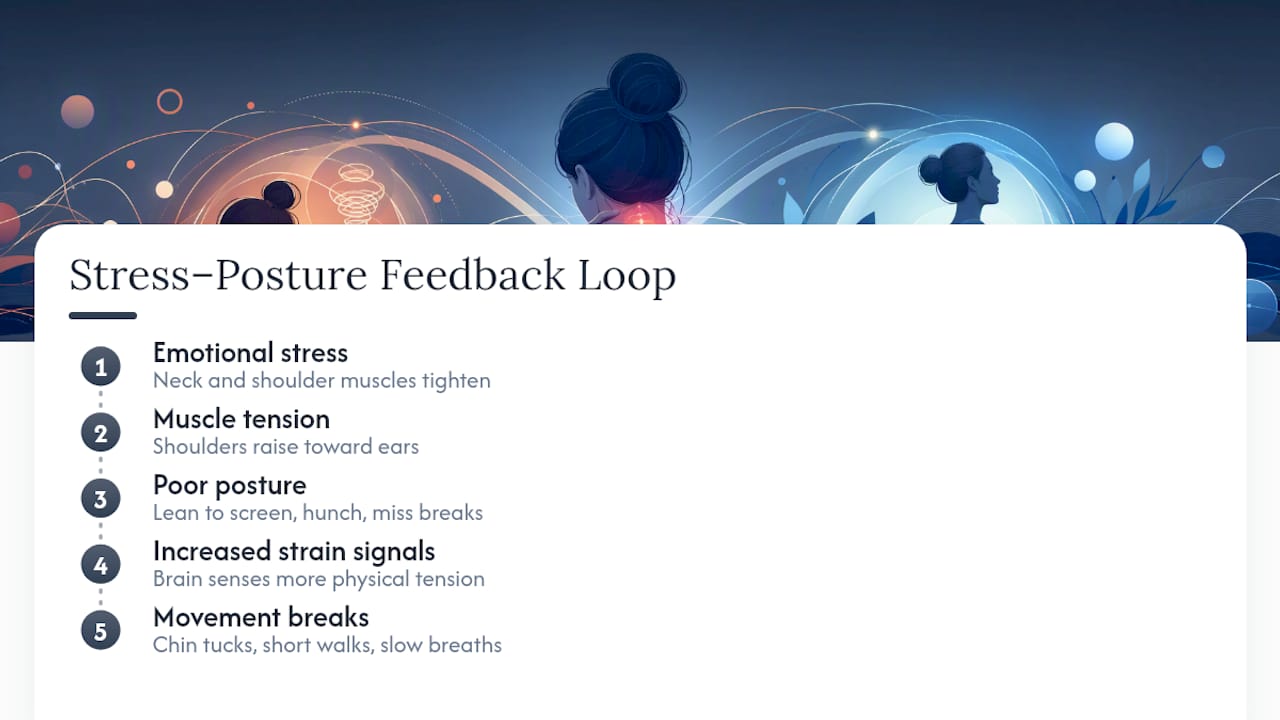
Muscle tension and emotional stress are connected in ways most people underestimate. When you’re stressed, your trapezius and levator scapulae muscles, the same ones running from your neck to your shoulders, tighten involuntarily. That’s why a hard deadline day often leaves your shoulders up near your ears without you noticing it happening.
Stress also changes how you sit. Under pressure, people tend to lean closer to their screens, hunch forward, and forget to take breaks entirely, which stacks mechanical strain on top of the muscular tension stress already causes. The two feed each other: tight muscles from stress make you sit worse, and worse posture increases the physical signals your brain reads as tension.
This doesn’t mean you need to solve your stress levels before your neck feels better. But building brief resets into stressful stretches of the day, a chin tuck, a short walk, a few slow breaths while sitting upright interrupt that feedback loop instead of letting it run all day. Workers who take movement breaks during high-pressure periods, rather than pushing through, tend to report less end-of-day stiffness, even when the total hours at the desk stay the same. If your job runs consistently high-stress, treat movement breaks as part of pain management, not an optional extra you’ll get to eventually.
Sleep, Hydration, and Activity: The Lifestyle Side of Neck Pain
What happens away from your desk shapes how your neck feels at your desk. Sleep position matters more than most people think: a pillow that’s too high or too flat forces your neck into the same forward or extended position you’re trying to correct during the day, undoing hours of good posture work overnight. A supportive pillow that keeps your neck roughly in line with your spine, whether you sleep on your back or side, matters as much as your chair does.
Hydration affects spinal discs directly. Discs are largely water, and mild dehydration reduces their ability to cushion the vertebrae in your neck, which can make existing stiffness feel worse by afternoon. Drinking water consistently through the day is a low-effort habit that supports the same tissue you’re trying to protect with better posture.
Physical activity outside work hours matters too, and not just for general health. A meta-analysis linking sedentary behavior to neck pain found that sitting four or more hours a day raises risk meaningfully, and that risk is separate from whatever movement breaks you take during the workday. Regular activity, walking, strength training, swimming, whatever you’ll actually keep doing, offsets total sedentary time in a way that desk breaks alone don’t fully cover. If your evenings are as sedentary as your workday, the math doesn’t work in your favor no matter how good your monitor height is.

What Actually Moves the Needle on Desk Neck Pain
Most advice on this topic treats posture as a discipline problem, something you fix by trying harder to sit up straight. That framing doesn’t hold up. Sitting perfectly upright for eight hours straight isn’t realistic, and the research backs that up: staying static in any position, even a good one, eventually stiffens tissue. The actual lever is frequency of movement, not the perfection of any single position.
The conventional advice also underweights the mid-back. Nearly everything written about neck pain focuses on the neck itself, chin tucks, neck stretches, when a rounded thoracic spine is often what’s dragging the head forward in the first place. Strengthening the upper back does more for long-term correction than another neck stretch ever will.
If you take one thing from this article, prioritize the screen height and movement frequency changes this week, then layer in chin tucks and mid-back strengthening once those become habit. Trying to fix everything simultaneously is why most people abandon posture advice within a few days.
— Madhukar
This article is general information, not a substitute for advice from a qualified doctor. Consult a qualified healthcare professional about your own circumstances before acting on anything here.
Sources
- Here’s how to set up your office to avoid aches and pain (Cleveland Clinic)
- A multi-component intervention (NEXpro) reduces neck pain: a randomized controlled trial among Swiss office workers
- Neck pain – Symptoms and causes (Mayo Clinic)
- Meta-analysis: sedentary behavior and risk of neck pain
- Addressing neck and back pain when you’re working from home (Johns Hopkins Medicine)